
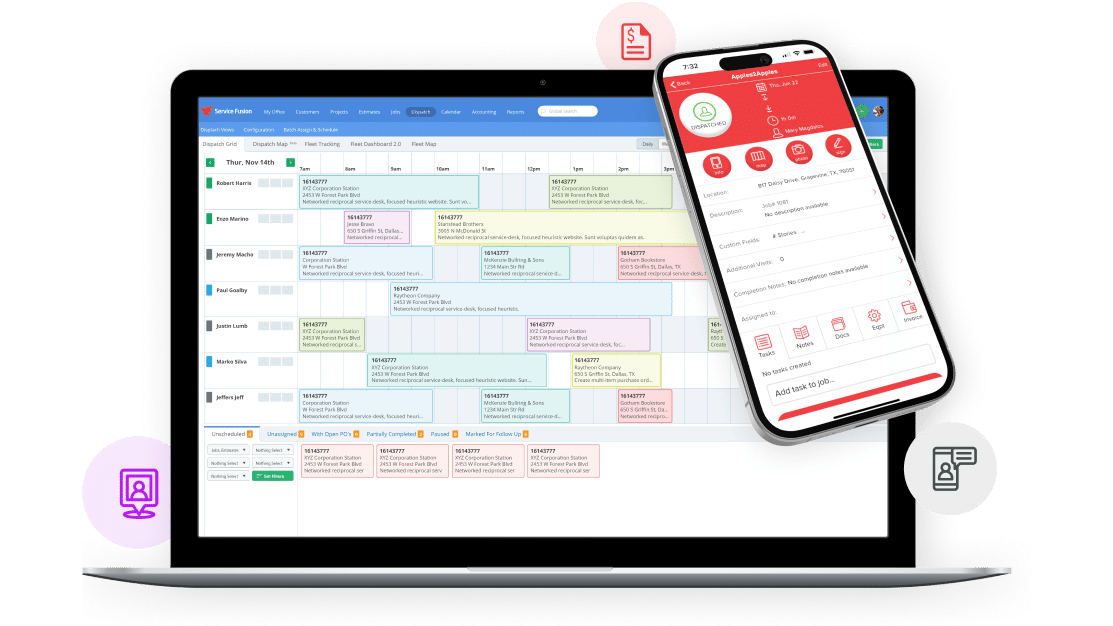
You manage appointments, crews, and client expectations, and scheduling should help—not hinder—you. Service schedule software automates bookings, matches the right technician to each job, and reduces scheduling conflicts so your team spends less time on logistics and more time on revenue-generating work.
This article breaks down the core features to look for and the practical benefits you’ll see after implementation, from real-time availability and mobile dispatching to simplified payroll and fewer missed appointments. Expect clear comparisons and actionable guidance to choose the tool that fits your business size and industry needs.
Key Features of Service Schedule Software
These features determine how well the software assigns technicians, communicates changes, and keeps customer records accurate. Focus on tools that reduce manual work, deliver instant updates, and link customer data to every appointment.
Automated Scheduling Tools
Automated scheduling assigns jobs based on rules you set: technician skills, certifications, parts availability, and travel time. You should prioritize systems that offer rule-based dispatch, drag-and-drop calendar overrides, and batch scheduling for recurring work.
Look for optimization functions that minimize drive time and balance workload across crews. Optimization often includes route calculations, cluster scheduling for multi-stop jobs, and blackout-date handling so you don’t assign unavailable staff.
Ask whether the tool supports service-level priorities and SLA enforcement. Effective automation also updates job durations based on historical completion times and notifies you when a manual adjustment is needed.
Real-Time Notifications
Real-time notifications keep your team and customers informed the moment a change occurs. Your software should push alerts for job assignments, arrival ETA updates, delays, and completion confirmations via SMS, email, and in-app messages.
Notification features should include templated messages you can customize, delivery tracking, and escalation rules when technicians don’t acknowledge a dispatch. Geo-fenced check-ins or automatic status changes based on location improve accuracy.
Also check for two-way messaging and mobile push support so technicians can confirm or update status on-site. Reliable notifications reduce no-shows, cut customer calls, and improve on-time performance.
Customer Management Integration
Customer management integration ties contact records, service history, billing, and asset details directly to each appointment. You need a system that displays past work orders, warranty or contract terms, and preferred technician notes at the point of dispatch.
Ensure the software syncs with your CRM or offers built-in customer profiles with fields for location-specific access instructions, parts used, and post-service follow-ups. Searchable histories let you identify repeat issues and upsell opportunities without switching apps.
Prioritize integrations with invoicing and payment processors so you can complete billing immediately after job completion. Tight customer-data links speed resolution times and maintain consistency across service interactions.
Benefits of Implementing Service Schedule Software
You will reduce manual work, improve response times, and gain actionable performance data that support staffing and routing choices. These gains translate into fewer missed appointments, clearer billing, and measurable productivity improvements.
Improved Operational Efficiency
Service schedule software automates appointment booking, dispatching, and route planning so your staff spends less time on phone calls and spreadsheets. Automated rostering matches technician skills and certifications to jobs, which reduces reassignments and repeat visits.
Real-time updates sync field staff with the office, cutting task handoffs and idle time. Mobile job details, signature capture, and integrated time tracking shorten job cycles and make payroll and invoicing more accurate.
Consider configuring rules for travel-time buffers and priority jobs. That reduces late arrivals and improves daily schedule adherence without adding manual oversight.
Enhanced Customer Satisfaction
You can offer online booking, automated confirmations, and precise arrival windows that set clear expectations for customers. SMS or email notifications for technician ETA and job completion reduce no-shows and cancellation confusion.
On-site employees with access to job history and customer preferences complete work faster and with fewer callbacks. Faster resolution and fewer billing errors directly increase positive reviews and repeat business.
Provide self-service options—rescheduling, status tracking, and payment—so customers control appointments without contacting support. That lowers call volume while keeping customers informed.
Data-Driven Decision Making
The software collects timestamps, travel distances, time-on-task, and first-time-fix rates so you can monitor productivity by technician, region, and job type. Use dashboards to spot underperforming routes or training gaps and to allocate overtime only where it improves throughput.
Exportable reports support more accurate job costing and pricing decisions based on actual labor and travel data. Historical trend analysis helps you forecast peak demand, plan staffing levels, and test whether routing changes cut fuel and labor costs.
Set KPIs—average response time, utilization rate, and billing accuracy—and track them continuously to drive incremental improvements rather than guessing where problems lie.